
#1. Process vs Thread - The Foundation Every Backend Engineer Must Know
The One Thing to Remember
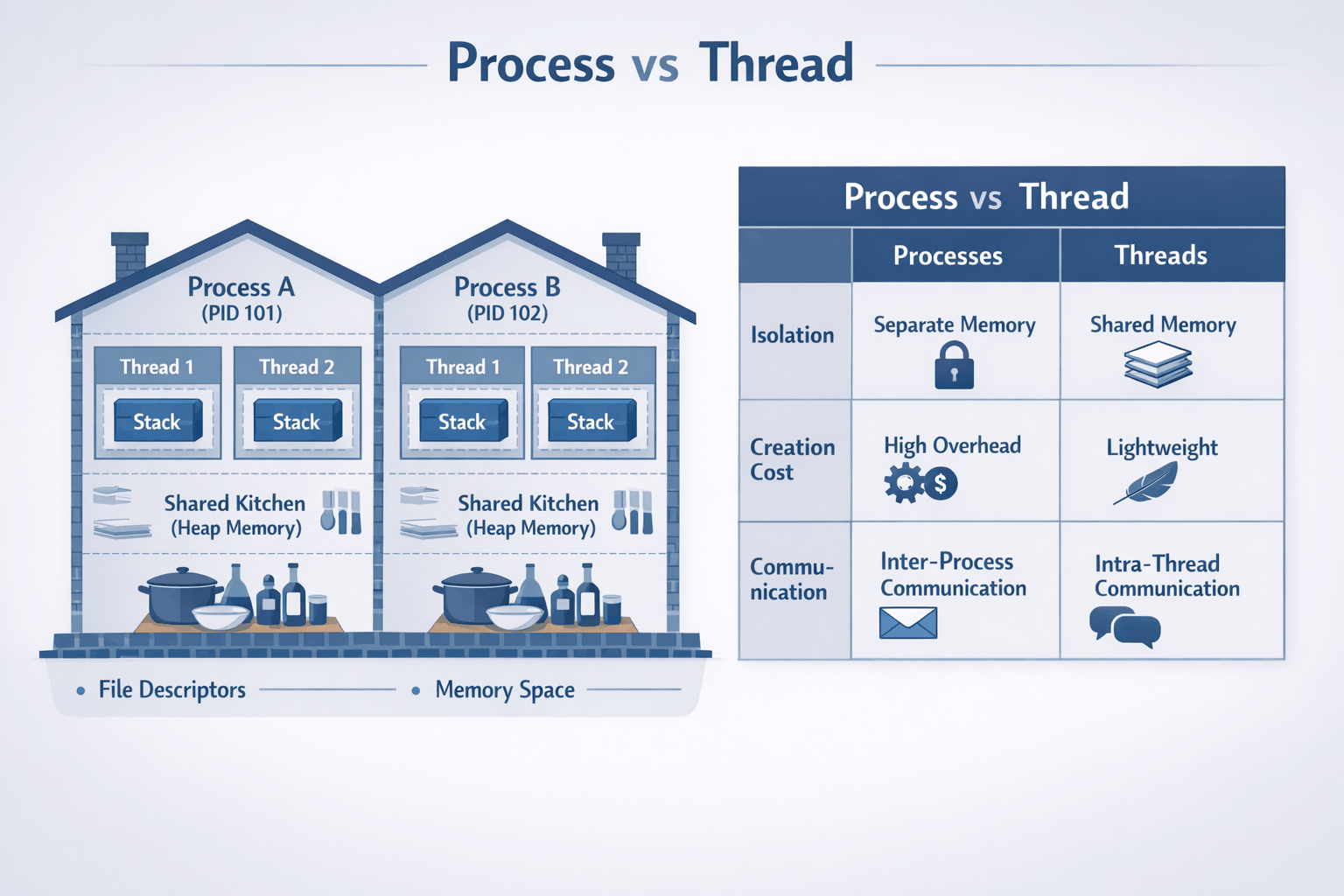
Process = house, Thread = room in the house.
But here's why you actually care: Ever had your entire Python app freeze because one request got stuck? Or watched your server crash when one user's code had a bug? That's the difference between processes and threads in action.
Threads share memory within a process; processes don't share memory with each other. This simple distinction drives almost every concurrency decision you'll make—and explains most of the "weird" bugs you've seen.
Why This Matters (A True Story)
Last year, I spent 8 hours debugging a production issue. The symptoms were bizarre: random data corruption, occasional crashes, and performance that degraded over time. I checked the database, the network, the load balancer—everything looked fine.
Then I remembered: threads share memory. One quick check later, I found a race condition in a shared cache. The fix? Two lines of code. The lesson? Understanding processes and threads would've saved me 8 hours.
This isn't academic knowledge—it's the difference between:
-
Debugging a race condition in 10 minutes vs 10 hours
- Knowing threads share memory = you immediately check for synchronization bugs
- Not knowing = you blame the database, the network, everything except the actual problem
-
Choosing the right architecture for a 10K concurrent users system
- Understanding isolation vs efficiency = you pick the right pattern
- Not understanding = you guess, and production breaks at 2AM (I've been there)
-
Understanding why your Python app doesn't scale with threads (GIL)
- Knowing GIL exists = you use multiprocessing for CPU work
- Not knowing = you add more threads, nothing improves, you're confused (I've done this too)
The good news: Once you internalize this, you'll see it everywhere. Every production issue, every design decision, every interview question—it all comes back to this foundation.
Quick Win: Check Your Current Setup
Before we dive deeper, let's see what you're actually running right now:
# See how many processes your app uses
ps aux | grep your-app-name | wc -l

# See how many threads per process
ps -eLf | grep your-app-name | awk '{print $2}' | sort | uniq -c

# If you see 1 process with 50 threads → thread-based
# If you see 10 processes with 5 threads each → hybrid (most common!)
What to look for:
- 1 process, many threads: Thread-based (good for I/O, watch for race conditions)
- Many processes, few threads each: Hybrid (this is what most production systems use)
- Many processes, 1 thread each: Process-based (maximum isolation, higher overhead)
The Mental Model (The House Analogy)
I've explained this to hundreds of engineers, and this analogy always sticks:
Processes: Isolated Houses
Think of a process as a house:
- Has its own address (memory space) - neighbors can't see inside
- Has its own resources (file handles, network connections) - separate utilities
- Walls separate it from neighbors - fire in one house doesn't spread
- If your neighbor's house catches fire, yours is protected
Real example: When Chrome runs each tab in a separate process, one malicious website can't access another tab's data. The "walls" (process isolation) protect you. This is why Chrome is more secure than old browsers.
Threads: Rooms in a House
A thread is a room within that house:
- All rooms share the same address - same street number
- Share the kitchen (heap memory) and front door (I/O resources) - common spaces
- People in different rooms can easily communicate by shouting - fast communication
- But they can also accidentally mess up shared spaces - race conditions!
Real example: A web server with multiple threads can share a connection pool (the "kitchen") but if two threads try to grab the same connection at once without coordination, chaos ensues. I've seen this cause connection pool exhaustion more times than I care to admit.
Visual Model
┌─────────────────────────────────────────────────────────────────────┐
│                         OPERATING SYSTEM                            │
│                    (The neighborhood manager)                       │
├───────────────────────────────┬─────────────────────────────────────┤
│        PROCESS A              │          PROCESS B                  │
│      (House #1234)            │        (House #5678)                │
│  ┌───────────────────────┐    │    ┌───────────────────────┐        │
│  │    Address Space      │    │    │    Address Space      │        │
│  │  ┌─────────────────┐  │    │    │  ┌─────────────────┐  │        │
│  │  │      HEAP       │  │    │    │  │      HEAP       │  │        │
│  │  │   (shared by    │  │    │    │  │   (shared by    │  │        │
│  │  │    threads)     │  │    │    │  │    threads)     │  │        │
│  │  │  "The Kitchen"  │  │    │    │  │  "The Kitchen"  │  │        │
│  │  └─────────────────┘  │    │    │  └─────────────────┘  │        │
│  │  ┌──────┐ ┌──────┐    │    │    │  ┌──────┐             │        │
│  │  │Stack │ │Stack │    │    │    │  │Stack │             │        │
│  │  │  T1  │ │  T2  │    │    │    │  │  T1  │             │        │
│  │  │Room1 │ │Room2 │    │    │    │  │Room1 │             │        │
│  │  └──────┘ └──────┘    │    │    │  └──────┘             │        │
│  └───────────────────────┘    │    └───────────────────────┘        │
│                               │                                     │
│  File Descriptors: 3,4,5      │    File Descriptors: 3,4            │
│  PID: 1234                    │    PID: 5678                        │
│  (Can't see Process B!)       │    (Can't see Process A!)           │
└───────────────────────────────┴─────────────────────────────────────┘

Key insight: Process A's threads can't see Process B's memory at all.
But Thread 1 and Thread 2 in Process A share the same heap (kitchen).
The Comparison Table
| Aspect | Process | Thread |
|---|---|---|
| Memory | Isolated address space | Shared address space |
| Creation cost | Heavy (~10ms, fork syscall) | Light (~1ms) |
| Communication | IPC (pipes, sockets, shared memory) | Direct memory access |
| Crash impact | Isolated (one crash doesn't affect others) | Takes down entire process |
| Context switch | Expensive (TLB flush, cache invalidation) | Cheaper (no TLB flush) |
| Debugging | Easier (isolated state) | Harder (shared state, race conditions) |
| Memory overhead | High (~10-50MB per process base) | Low (~1MB per thread stack) |
Quick Jargon Buster
- IPC (Inter-Process Communication): How processes talk to each other. Like sending mail between houses—pipes, sockets, or shared memory segments.
- TLB (Translation Lookaside Buffer): CPU's "address book" for memory locations. When switching processes, this cache gets flushed, causing expensive lookups. This is why context switches between processes are slower.
- Context Switch: OS switching from one thread/process to another. Like changing tasks—saves current state, loads new state. Happens thousands of times per second.
- GIL (Global Interpreter Lock): Python's rule that only one thread can run Python code at a time. Threads can do I/O in parallel, but CPU work is serialized. This is why Python threads don't help with CPU-bound work.
Common Mistakes (I've Made These)
Mistake #1: "Threads Are Always Faster"
Why it's wrong:
- Context switching has cost (~1-10μs per switch)
- Cache invalidation hurts performance (CPU cache misses)
- Lock contention can make threads slower than single-threaded
Real example: I once tried to speed up image processing by using threads. It got slower. Why? Lock contention on the shared image buffer. Single-threaded was faster.
Right approach:
- Benchmark your specific workload (don't assume)
- For I/O-bound: threads help (database queries, network calls)
- For CPU-bound with shared state: often slower due to locking
Mistake #2: "Shared Memory Is Free"
Why it's wrong:
- Requires synchronization (locks, atomics) - this has overhead
- Lock contention becomes bottleneck (threads waiting for locks)
- Debugging is much harder (race conditions are intermittent)
Right approach:
- Prefer message passing when possible (cleaner, easier to reason about)
- Minimize shared state (less to synchronize)
- Use immutable data structures (no synchronization needed)
Mistake #3: "More Threads = More Speed"
Why it's wrong:
- Beyond CPU core count, you just add context-switching overhead
- Each thread consumes memory (stack space, typically 1-8MB)
- Lock contention increases with thread count (more threads = more contention)
Right approach:
- Rule of thumb: threads ≈ CPU cores for CPU-bound work
- For I/O-bound: threads ≈ concurrent I/O operations needed
- Measure, don't guess (profile your application)
Trade-offs: The Decision Framework
When to Use Processes
✅ Choose processes when:
-
Isolation is critical
- One component crashing shouldn't bring down others
- Example: Chrome uses process-per-tab so one bad tab doesn't crash the browser
- Real scenario: I once had a worker process crash due to a memory leak. Because it was isolated, other workers kept serving requests while we restarted it.
-
Security boundaries matter
- Different trust levels (user code vs system code)
- Multi-tenant systems where tenants shouldn't see each other's data
- Example: Running untrusted user code in a sandboxed process
-
You need to scale beyond one machine
- Processes are the natural unit for distributed systems
- Each server runs a process; easier to reason about
- Kubernetes pods, Docker containers - these are processes
-
CPU-bound work in Python/Ruby
- GIL (Global Interpreter Lock): Python's "one thread at a time" rule for CPU work
- Threads can't actually run Python code in parallel (they can for I/O though!)
multiprocessinggives you actual parallel execution by using separate processes- Why this matters: If you're doing heavy computation in Python, threads won't help—you need processes
Trade-off cost: Higher memory usage (~10-50MB per process), slower communication between components (IPC overhead)
When to Use Threads
✅ Choose threads when:
-
Shared state is natural
- In-memory caches that all handlers need
- Connection pools shared across requests
- Example: A Redis connection pool shared by all request handlers
-
I/O-bound workloads
- While one thread waits for database, others can work
- Network servers, API gateways
- Example: A web server handling HTTP requests - while one thread waits for DB, others handle new requests
-
Memory is constrained
- 10,000 threads use less memory than 10,000 processes
- Embedded systems, mobile apps
- Example: A mobile app with limited RAM can't afford process overhead
-
Low-latency communication needed
- Shared memory access is nanoseconds
- IPC is microseconds to milliseconds
- Example: Real-time trading systems where every microsecond counts
Trade-off cost: Harder debugging (race conditions are hard to reproduce), risk of race conditions, crash affects all threads
The Hybrid Approach (What Most Production Systems Use)
Most real systems use both - and this is what I recommend:
┌────────────────────────────────────────────────────────────┐
│                    Production Architecture                 │
├────────────────────────────────────────────────────────────┤
│                                                            │
│  ┌───────────────┐  ┌───────────────┐  ┌───────────────┐   │
│  │  Process 1    │  │  Process 2    │  │  Process 3    │   │
│  │  (Worker)     │  │  (Worker)     │  │  (Worker)     │   │
│  │ ┌───────────┐ │  │ ┌───────────┐ │  │ ┌───────────┐ │   │
│  │ │ Thread 1  │ │  │ │ Thread 1  │ │  │ │ Thread 1  │ │   │
│  │ │ Thread 2  │ │  │ │ Thread 2  │ │  │ │ Thread 2  │ │   │
│  │ │ Thread 3  │ │  │ │ Thread 3  │ │  │ │ Thread 3  │ │   │
│  │ └───────────┘ │  │ └───────────┘ │  │ └───────────┘ │   │
│  └───────────────┘  └───────────────┘  └───────────────┘   │
│         │                  │                  │            │
│         └──────────────────┼──────────────────┘            │
│                            │                               │
│                      ┌─────┴─────┐                         │
│                      │   Load    │                         │
│                      │  Balancer │                         │
│                      └───────────┘                         │
└────────────────────────────────────────────────────────────┘

Example: Gunicorn with workers and threads
  gunicorn --workers=4 --threads=2 app:app
  = 4 processes × 2 threads = 8 concurrent handlers

Why this works:
- Process isolation: One worker crash doesn't kill all
- Thread efficiency: Share connection pools within worker
- Scale: Add more workers as load increases
This is what Instagram did, what most Django/Flask apps do, and what I've used in production for years. It gives you the best of both worlds.
Code Examples (The Bug I Introduced)
Demonstrating Thread Shared Memory (and Bugs!)
This is a simplified version of a bug I introduced in production once. Don't judge:
import threading
import time

# Shared variable - threads can all see and modify this
shared_counter = 0

def thread_worker():
    global shared_counter
    for _ in range(100000):
        shared_counter += 1  # NOT atomic! Read-modify-write
        # This is actually:
        # 1. Read shared_counter (e.g., 42)
        # 2. Add 1 (43)
        # 3. Write back (43)
        # Another thread might read 42 between steps 1 and 3!

# Create 2 threads
threads = [threading.Thread(target=thread_worker) for _ in range(2)]

# Start them
for t in threads:
    t.start()

# Wait for completion
for t in threads:
    t.join()

# Expected: 200000 (100000 × 2)
# Actual: Something less, like 134672 (race condition!)
print(f"Expected: 200000, Got: {shared_counter}")
Run this and you'll see the race condition in action. The counter will be less than 200000 because threads are stepping on each other.
Fixing with Proper Synchronization
Here's how to fix it (the right way):
import threading

shared_counter = 0
lock = threading.Lock()

def thread_worker_safe():
    global shared_counter
    for _ in range(100000):
        with lock:  # Only one thread can hold the lock
            shared_counter += 1

threads = [threading.Thread(target=thread_worker_safe) for _ in range(2)]
for t in threads:
    t.start()
for t in threads:
    t.join()

print(f"Expected: 200000, Got: {shared_counter}")  # Now correct!
The lock ensures only one thread modifies the counter at a time. This is slower (locks have overhead), but it's correct.
Process Isolation Demo
With processes, you don't have this problem:
import multiprocessing
import os

def process_worker(name):
    # Each process has its own memory space
    local_counter = 0
    for _ in range(100000):
        local_counter += 1
    print(f"Process {name} (PID: {os.getpid()}): counter = {local_counter}")
    # No race condition possible - each process has its own counter!

# Create 2 processes
processes = [
    multiprocessing.Process(target=process_worker, args=(i,))
    for i in range(2)
]

for p in processes:
    p.start()
for p in processes:
    p.join()

# Each prints 100000 - no interference
Each process has its own memory, so no race conditions. But communication between processes is slower (IPC overhead).
Real-World Trade-off Stories
Instagram: GIL Forced the Decision (Real Story)
Situation: Instagram runs the world's largest Django deployment, serving over 500 million users. Early on, they struggled with Python's GIL limiting their ability to scale with threads. According to their engineering blog, they needed to handle hundreds of millions of users without constantly adding server capacity.
Decision: Move to multi-process model with Gunicorn's pre-fork worker architecture. They use the formula (2 × number of CPU cores) + 1 workers, which is Gunicorn's recommended starting point.
Trade-off accepted:
- Higher memory usage (each worker loads Django independently, ~50MB+ per worker)
- Process management overhead
- But: Actual parallel execution across CPU cores
Result: According to Instagram's engineering team, they achieved linear scaling with added workers. The pre-fork model allows the OS kernel to handle load balancing between workers automatically. They can now handle hundreds or thousands of requests per second with just 4-12 worker processes—not scaling linearly with client count.
Key insight from their blog: For CPU-bound apps, increase workers and cores. For I/O-bound apps, they use pseudo-threads (Eventlet/Gevent). The process model gave them the isolation and true parallelism they needed.
References:
- Instagram Engineering: Adaptive Process and Memory Management
- Instagram Engineering: Web Service Efficiency with Python
Lesson: Know your runtime's limitations. Python threads don't parallelize CPU work. If you're doing CPU-bound work in Python, use processes. Instagram's success with this approach is why Gunicorn is the default for Django/Flask apps.
Chrome: Site Isolation Architecture (The Real Story)
Situation: Early browsers (like Internet Explorer) used single-process, multi-threaded architecture. One bad tab could crash the entire browser—I remember losing all my tabs when one website crashed. Chrome needed a better security model.
Decision: Chrome pioneered a multi-process architecture, but it's more sophisticated than "one process per tab." They implemented Site Isolation, where pages from different websites always run in separate renderer processes, each in a sandbox.
How it actually works:
- A "site" is defined as the scheme and registered domain (ignoring subdomains, port, or path)
- Multiple tabs from the same site may share a process (e.g., multiple Gmail tabs)
- Different sites are always isolated in separate processes
- Each renderer process contains
RenderFrameobjects managed by the browser process
Trade-offs accepted:
- ~50MB+ extra memory per process (significant, especially on mobile)
- IPC overhead for communication between processes (using Mojo/Chrome IPC)
- More complex architecture (browser process manages renderer processes)
What they gained:
- Security: Malicious sites can't access other sites' memory (defense-in-depth)
- Stability: One tab crashing doesn't kill others (this was revolutionary in 2008)
- Performance: Tabs can use multiple CPU cores effectively
- Spectre protection: Site Isolation protects against speculative side-channel attacks
Deployment: Site Isolation was enabled by default on all desktop sites in Chrome 67 and on Android (for authenticated sites) in Chrome 77.
References:
- Chrome: Site Isolation Design Document
- Chrome: Multi-process Architecture
- Google Research: Site Isolation Paper
Lesson: Sometimes isolation is worth the resource cost. Chrome's stability and security improvements were worth the memory overhead. This architecture is now standard across modern browsers.
Discord: Scaling Elixir to 5 Million Concurrent Users (The Real Numbers)
Situation: Discord needed to handle millions of concurrent WebSocket connections for real-time messaging. Traditional threading models (Java, C++) couldn't scale to this level efficiently. They needed to handle millions of events per second.
Decision: From day one, Discord chose Elixir (running on Erlang VM) to power their WebSocket gateway. According to Jake Heinz, Lead Software Engineer at Discord: "In terms of real time communication, the Erlang VM is the best tool for the job."
The scale they achieved:
- 5 million concurrent users initially
- Over 12 million concurrent users across all servers (as of 2020)
- Over 26 million WebSocket events to clients per second
- Millions of events per second flowing through the system
Why this worked:
- Erlang processes are ~2KB each (not OS processes—much lighter than OS threads)
- Isolation: One process crashing doesn't affect others (supervision trees restart them)
- Message passing: Prevents shared state bugs (no locks needed)
- Built-in distribution: Erlang VM supports distributed systems natively
Architecture details:
- GenServer processes for each user session
- Communication with remote Erlang nodes containing guild (server) processes
- Pub/sub model for fanning out messages to connected sessions
- GenStage library for handling push notification bursts (over a million per minute) with backpressure
Today: Discord's Elixir stack contains approximately 20 services, each independently scalable.
References:
- Discord Blog: How Discord Scaled Elixir to 5,000,000 Concurrent Users
- Elixir Blog: Real-time Communication at Scale with Elixir at Discord
- Discord Blog: Handling Push Request Bursts with GenStage
Lesson: Sometimes the runtime/language choice determines your concurrency model. Erlang/Elixir's actor model (lightweight processes) is perfect for highly concurrent, real-time systems. Discord's success proves that lightweight processes can scale to millions of concurrent connections.
Common Confusions (Cleared Up)
"But I use async/await, not threads!"
Reality: Async/await is still using threads (or a single thread with an event loop). The difference:
- Threads: OS manages switching between threads (preemptive multitasking)
- Async: Your code explicitly yields control (cooperative multitasking)
Both still need to understand process vs thread isolation! Async doesn't eliminate the need to understand these concepts. In fact, async/await in Python still uses threads under the hood (via asyncio's thread pool for blocking I/O).
"Go uses goroutines, not threads!"
Reality: Goroutines are lightweight threads managed by Go's runtime. They're still threads, just more efficient (Go runtime multiplexes many goroutines onto fewer OS threads). The process/thread distinction still applies—goroutines within a process share memory. This is why Go has channels and mutexes - to coordinate shared state.
"Docker containers are processes, right?"
Reality: Yes! Each container is essentially a process (or a group of processes). Understanding process isolation helps you understand container isolation. Containers add filesystem and network isolation on top of process isolation. This is why containers are so useful - they give you process isolation with extra security boundaries.
"Node.js is single-threaded, so this doesn't apply!"
Reality: Node.js uses a single main thread, but:
- It uses a thread pool for I/O operations (libuv, default 4 threads)
- Worker threads exist for CPU-intensive work (Node.js 12+)
- Understanding processes vs threads helps you decide when to use worker threads vs worker processes
Try It Yourself (30 seconds each)
See Processes on Your System
# See all processes
ps aux | head -20

# See YOUR processes
ps aux | grep $USER | head -10

# See process tree (parent-child relationships)
pstree -p $$ | head -20
See Threads Within a Process
# See threads (LWP = Light Weight Process = thread)
ps -eLf | head -20

# See threads of a specific process (e.g., your shell)
ps -T -p $$

# Watch thread count of Python in real-time
# First, run a Python script, then:
watch -n 1 "ps -o pid,nlwp,cmd -p \$(pgrep python | head -1)"
Monitor Context Switches
# See context switches per second
vmstat 1 5
# Look at 'cs' column - higher = more switching = potential overhead
Decision Checklist
Use this checklist when deciding between processes and threads:
□ Do I need crash isolation?
  → Yes: Consider processes
  → No: Threads are fine

□ Do I need to share large amounts of data?
  → Yes: Threads (shared memory) are simpler
  → No: Processes with message passing

□ Is my workload CPU-bound or I/O-bound?
  → CPU-bound in Python/Ruby: Processes (GIL)
  → CPU-bound in Go/Java/C++: Either works
  → I/O-bound: Threads (or async I/O)

□ How many concurrent operations do I need?
  → <100: Either works, choose simpler option
  → 100-10,000: Threads are more memory-efficient
  → >10,000: Consider async I/O (epoll/io_uring)

□ What's my team's expertise?
  → Multi-threading is harder to debug
  → Multi-process is easier to reason about
Memory Trick
"TIPS" for choosing:
- Threads: Share memory, need synchronization
- Isolation: Processes give you crash protection
- Performance: Threads for I/O, processes for CPU
- Simplicity: Processes are easier to reason about
Self-Assessment
Before moving to the next article, make sure you can:
- [ ] Explain why threads share heap but have separate stacks
- [ ] Identify a race condition in code (like the counter example)
- [ ] Know when to use
multiprocessingvsthreadingin Python - [ ] Explain why Chrome uses process-per-tab
- [ ] Draw the memory model diagram from memory
- [ ] Explain what GIL is and why it matters for Python
- [ ] Debug a production issue involving processes/threads
Key Takeaways
- Threads share memory - fast communication but requires synchronization
- Processes are isolated - safer but higher overhead
- Most production systems use both - processes for isolation, threads for efficiency within each process
- Know your runtime - Python GIL, Erlang actors, Go goroutines all behave differently
- Measure, don't assume - "threads are faster" is often wrong
- Isolation often beats efficiency - especially when one component failure shouldn't kill others
What's Next
Now that you understand how processes and threads work, the next question is: How does the OS actually manage memory for all these processes?
In the next article, Memory Management Demystified - Virtual Memory, Page Faults & Performance, you'll learn:
- Why a "2GB process" might only use 100MB of actual RAM (this confused me for years)
- How virtual memory creates the illusion of infinite memory
- When page faults kill your performance (and how to avoid them)
- Why adding more RAM doesn't always help (I've wasted money on this)
This builds directly on what you learned here—each process gets its own virtual address space, but how does the OS juggle all that physical RAM? Let's find out.
→ Continue to Article 2: Memory Management
This article is part of the Backend Engineering Mastery series. Follow along for comprehensive guides on building robust, scalable systems.